
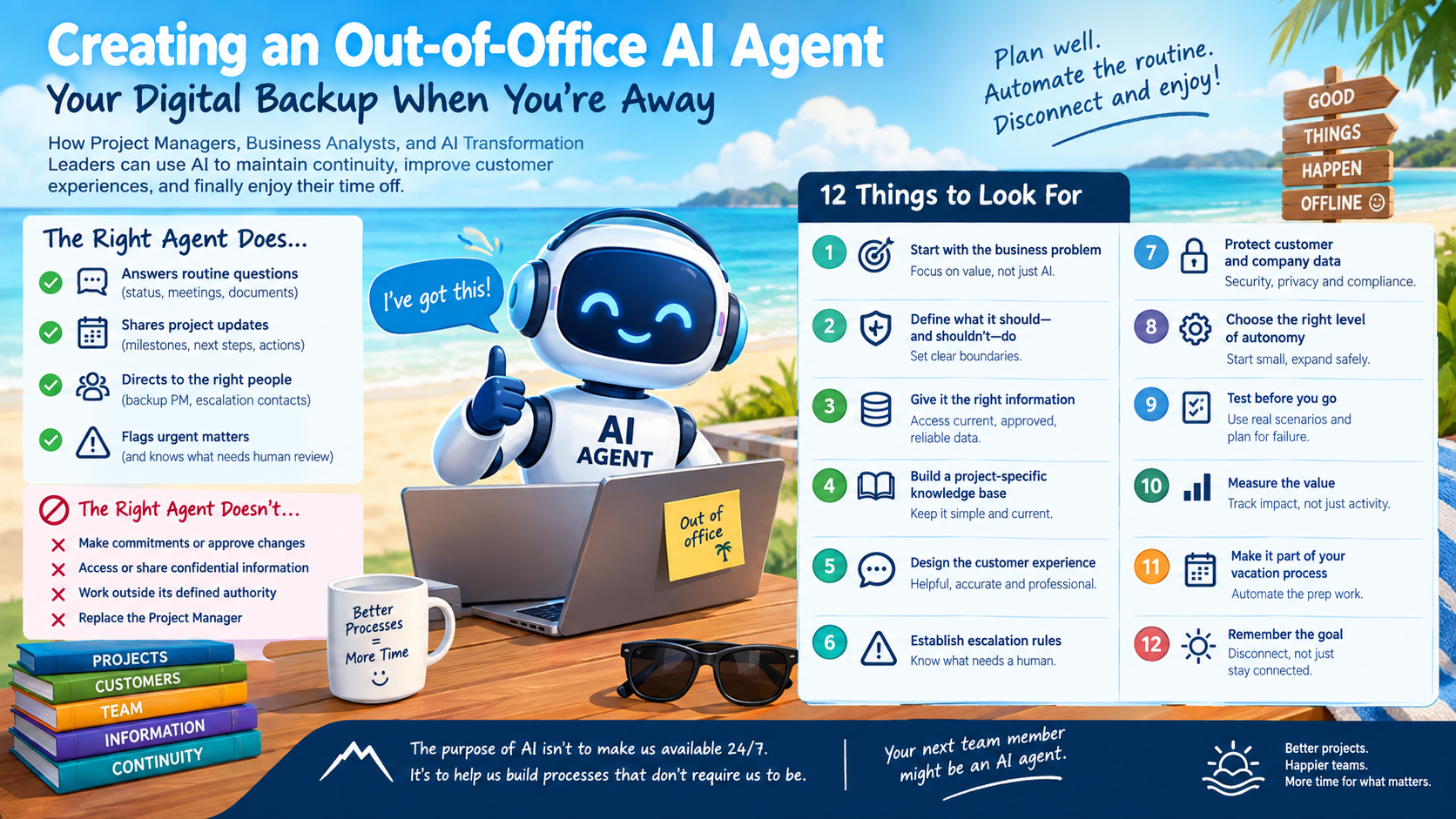
How Project Managers, Business Analysts, and AI Transformation Leaders can use AI to maintain continuity, improve customer experiences, and finally enjoy their time off.
There is nothing quite like preparing for a vacation, only to spend the last few days worrying about everything you might be leaving behind.
As Project Managers, we know the drill. We update project plans, prepare handover notes, brief our colleagues, send status reports, and make sure everyone knows who to contact while we are away.
And then we go on vacation.
Or at least, we try to.
A customer sends an email asking for a project update. A colleague needs to know when a milestone is due. Someone wants to know who is responsible for the next deliverable. Suddenly, our carefully planned time off becomes an exercise in resisting the urge to check our inbox.
What if we could build an AI agent that helps manage those questions while we’re away?
Imagine an Out-of-Office AI Agent that understands your projects, knows where to find key information, responds to routine inquiries, directs urgent matters to the right people, and helps ensure that work continues without you.
It sounds great in theory. But, as with any AI initiative, the real value isn’t in simply creating the agent. It’s in designing it to do the right things, with the right information, within the right boundaries.
Here are the key things I would consider before building one.
1. Start with the business problem, not the AI
As a Business Analyst, my first question is always: What problem are we trying to solve?
The objective isn’t to create an AI agent because AI is the latest technology. The objective is to improve business continuity, reduce unnecessary delays, and provide a better experience for customers and colleagues.
Before building anything, identify the challenges that arise when someone is out of the office.
For example:
- Customers don’t know who to contact while their PM is away.
- Colleagues spend time searching for project information.
- Routine questions sit unanswered until someone returns.
- Important actions or upcoming milestones are overlooked.
- The person covering the project has to piece together information from multiple sources.
Once these challenges are understood, we can define what the agent should accomplish.
The goal: Keep projects moving without requiring the absent employee to remain connected.
2. Define what the agent should—and should not—do
One of the most important steps in designing an AI agent is establishing its boundaries.
An Out-of-Office Agent should be capable of handling routine, predictable requests. It should not become an unsupervised replacement for the Project Manager.
I would begin by identifying the agent’s responsibilities.
What it should do
- Answer approved, frequently asked questions.
- Provide project status based on current information.
- Identify upcoming milestones and outstanding actions.
- Share approved handover information.
- Direct inquiries to the designated backup.
- Flag urgent requests for human attention.
What it should not do without authorization
- Commit to new project dates or deliverables.
- Approve scope changes or additional costs.
- Make contractual commitments.
- Disclose confidential project information.
- Resolve escalations requiring management judgment.
- Make decisions outside its defined authority.
This is where good Project Management and Business Analysis practices come into play.
We need clear requirements, defined responsibilities, business rules, and escalation paths.
The agent should know when it can answer, when it should refer someone elsewhere, and when it must leave the decision to a human.
3. Give the agent the right information
An AI agent is only as useful as the information it can access.
If we want it to answer questions about our projects, we need to give it access to the appropriate, current, and approved information.
Depending on the organization’s systems and security policies, this might include:
- Project charters and project plans.
- Current status reports.
- Milestone dates and project schedules.
- RAID logs (Risks, Assumptions, Issues, and Dependencies).
- Outstanding action items and their owners.
- Customer contacts and escalation procedures.
- Project handover notes.
- Frequently asked questions and approved response templates.
However, simply giving an agent access to a collection of documents isn’t enough.
We need to consider whether the information is current, whether conflicting versions exist, and whether the agent can distinguish between an approved project commitment and an outdated planning assumption.
For example, if last month’s status report says a milestone is scheduled for October 15, but the current project plan says October 22, which date should the agent communicate?
That decision shouldn’t be left to chance.
Establish a source of truth for each information category, define how frequently information is refreshed, and instruct the agent to acknowledge when information is missing or uncertain.
An agent that confidently provides outdated information can create more problems than having no agent at all.
4. Build a project-specific knowledge base
As a Senior Project Manager, I wouldn’t want my Out-of-Office Agent providing generic responses when someone asks a question about a specific project.
I would want it to understand the context.
For each active project, consider maintaining a concise handover profile containing:
Information
What the agent needs to know
Project overview
Objectives, scope, and current phase
Current status
Progress, health, and key developments
Next milestones
Dates, dependencies, and deliverables
Outstanding actions
Action, owner, and due date
Key contacts
Customer, project team, and backup PM
Risks and issues
Current concerns and mitigation plans
Escalation process
Who to contact and under what circumstances
This information could be maintained in a project management platform, a structured document, or an approved knowledge repository.
The important thing is that the information is easy to maintain and available to the agent when needed.
I would also include a clear “last updated” timestamp. This gives the agent a way to recognize when information may no longer be reliable.
5. Design the customer experience
Let’s look at a practical example.
A customer emails you while you’re away:
“Hi Morgan, can you confirm where we stand with the data migration and whether we’re still on track for our next milestone?”
Without an agent, the customer might wait several days for a response or need to contact someone else.
With an appropriately configured agent, the experience could look something like this:
Customer inquiry
Hi Morgan, can you confirm where we stand with the data migration and whether we’re still on track for our next milestone?
Out-of-Office AI Agent
Thank you for reaching out. Morgan is currently out of the office and will return on October 14.
Based on the latest approved project update, data migration is in progress. The next milestone is currently scheduled for October 15.
For the latest confirmation of the project schedule, please contact Jane Smith, who is covering the project during Mug’s absence.
If your inquiry is urgent, please use the escalation contact provided in your project communications.
Illustrative example. The agent should only provide dates and status information it can verify from authorized sources.
Notice what the agent does here.
It provides a useful response, shares relevant information, and directs the customer to the appropriate person for confirmation.
It doesn’t invent a progress percentage, promise that the milestone will be met, or pretend to be the Project Manager.
That distinction is critical.
6. Establish escalation rules
Not every email should receive an automated response.
Some messages require immediate attention, while others can wait until the employee returns.
I would define escalation rules based on business impact, urgency, and the type of request.
For example:
Inquiry type
Agent response
Routine status request
Provide verified status
Potential milestone delay
Notify the designated backup
Customer complaint
Escalate to the appropriate contact
Scope or budget change
Refer to the authorized decision-maker
Security or privacy concern
The agent should also understand what constitutes an urgent request.
A customer saying “urgent” doesn’t automatically mean an issue is critical. Equally, a seemingly routine message might reveal a significant project risk.
This is where well-defined business rules, classification criteria, and human oversight become essential.
7. Protect customer information and company data
This is an area where AI transformation leaders need to work closely with IT, Security, Privacy, and Compliance.
An Out-of-Office Agent may have access to customer information, project documentation, internal discussions, and business-sensitive data.
Before deploying it, consider:
- Access controls: Can the agent access only the projects and information it is authorized to use?
- Data privacy: Is customer information handled according to company policies and applicable privacy requirements?
- Identity and transparency: Is it clear to recipients that they are interacting with an AI agent?
- Auditability: Can the organization review what the agent communicated and why?
- Data retention: Are interactions retained in accordance with company policy?
- Permissions: Can the agent send emails, modify records, or access systems beyond what it actually needs?
I would follow the principle of least privilege: give the agent only the access necessary to perform its assigned responsibilities.
I would also start with read-only access wherever possible.
An agent that can retrieve project status is one thing. An agent that can modify the project schedule, send commitments to customers, or approve changes is an entirely different proposition.
8. Decide how autonomous the agent should be
Not every Out-of-Office Agent needs the same level of autonomy.
I would approach this in stages.
Level 1
Informational assistant
Answers questions using approved information and provides links to relevant resources. No independent outbound communication.
Level 2
Supervised responder
Drafts responses for a designated colleague to review and send. Useful for validating accuracy and tone.
Level 3
Controlled autonomous agent
Sends approved types of responses, routes inquiries, and triggers predefined workflows within established permissions.
I would start with Level 1 or Level 2, measure the results, and expand the agent’s responsibilities only when there is evidence that it can perform reliably.
The objective isn’t maximum autonomy.
The objective is the right level of autonomy for the business risk.
9. Test the agent before going on vacation
One of the worst times to discover a problem with your Out-of-Office Agent is when you’re sitting on a beach, several time zones away.
Before deployment, I would test the agent against realistic scenarios.
Here are some examples:
Pre-deployment test checklist
0 of 8
Routine status inquiry
Does the agent provide accurate information from the latest approved status report?
Conflicting project dates
Does it identify the conflict rather than select a date at random?
Missing information
Does it acknowledge the gap and direct the inquiry to a human?
Urgent customer issue
Does it follow the correct escalation process?
Scope change request
Does it avoid making unauthorized commitments?
Unauthorized information request
Does it refuse to disclose information the requester cannot access?
Outdated handover notes
Does it recognize stale information and avoid presenting it as current?
Agent unavailable
Is there a fallback process if the agent or its connected systems fail?
Reset checklist
I would also conduct a pilot while the employee is still available to monitor the results.
Test actual questions, review the responses, identify gaps, and refine the instructions.
And don’t forget to test the failure scenarios. What happens if the knowledge base is unavailable? What if the agent cannot identify the correct backup? What happens if it receives a question outside its area of responsibility?
A reliable agent needs a reliable fallback.
10. Measure the value it delivers
As Project Managers, we know that completing an activity doesn’t automatically mean we’ve delivered value.
The same principle applies to AI.
I would establish a baseline before introducing the agent and measure its performance during the pilot.
Some useful metrics include:
- Response time: How quickly are routine inquiries acknowledged or answered?
- Resolution rate: What percentage of inquiries are handled correctly without additional intervention?
- Accuracy: How often does the agent provide information that matches the approved source?
- Escalation effectiveness: Are urgent inquiries reaching the right person promptly?
- Customer experience: Are customers receiving useful, timely responses?
- Time saved: How much administrative work is avoided by the employee and backup team?
- Error rate: How often does the agent provide incorrect, incomplete, or unauthorized information?
I would be particularly interested in the time saved by the broader team.
If the agent saves me 30 minutes a day but creates an hour of additional work for the colleague covering my projects, we haven’t achieved the intended benefit.
The objective is to improve the overall process, not simply move the work somewhere else.
11. Make the agent part of your vacation planning process
This is where I see an opportunity to connect AI with an existing Project Management process.
Instead of treating the Out-of-Office Agent as a standalone tool, make it part of your standard pre-vacation checklist.
For example, when an employee schedules time off, a workflow could:
- Identify active projects and upcoming milestones.
- Gather outstanding actions, risks, and issues.
- Prepare a draft handover summary.
- Identify the designated backup for each project.
- Confirm escalation contacts and coverage arrangements.
- Validate that project information is current.
- Activate the agent for the approved absence period.
- Disable or transition the agent when the employee returns.
The handover summary should be reviewed by the employee before activation, particularly when it contains customer commitments or sensitive information.
This is where the combination of AI agents and workflow automation becomes particularly interesting.
The agent handles the conversations. The workflow handles the preparation, coordination, and activation.
And the Project Manager remains accountable for the handover and the decisions that require human judgment.
12. Remember that the goal is to disconnect
As someone who has spent years managing projects, I understand the temptation to stay connected.
We want to help our customers. We want to support our colleagues. We want to make sure everything continues to run smoothly.
But taking time off is important, too.
An Out-of-Office AI Agent should not become another reason to check your phone, monitor a dashboard, or worry about what might be happening while you’re away.
If the agent requires constant supervision, frequent corrections, or regular intervention from the person on vacation, then we need to revisit the design.
The real test is whether the agent helps the organization operate effectively while allowing the employee to step away.
That means having clear ownership, capable backup resources, reliable information, and appropriate escalation procedures.
AI can support all of these things, but it cannot compensate for a missing business process.
One Last Thing: Your next team member might be an AI agent
As Project Managers, Business Analysts, and AI transformation leaders, we have an opportunity to rethink how we manage work when we’re unavailable.
An Out-of-Office AI Agent is a practical starting point because it addresses a familiar business problem: maintaining continuity when a key person is away.
It also provides an opportunity to apply some of the fundamentals we already know:
- Define the business problem.
- Gather and document requirements.
- Establish roles and responsibilities.
- Identify risks and controls.
- Design the workflow.
- Test the solution.
- Measure the results.
- Continuously improve.
The technology may be new, but the disciplines required to implement it successfully are not.
And perhaps the most important lesson is this:
The purpose of AI isn’t to make us available 24/7. It’s to help us build processes that don’t require us to be.
Because a successful vacation shouldn’t depend on how quickly you can respond to an email from the beach.
It should depend on how well you prepared before you left.
A question for my fellow PMs, BAs, and AI champions:
If you could build an Out-of-Office AI Agent today, what would be the first task you would delegate to it?
Would you start with customer inquiries, project status updates, action-item tracking, or something else?
I’d be interested to hear what others are exploring as we continue to find practical ways to use AI to improve how we work.